FOR RPG MAKER MZ / MV DEVELOPERS
AI Spritesheet Generator for RPG Maker MZ & MV
Generate four-direction character sprites, convert a detailed animation atlas to the RPG Maker layout, and export for MZ or MV.
Create my character →REAL GENERATION / NOT A MOCKUP
One knight. Four directions.
This example contains down, left, right, and up walking tracks: 8 frames each, 32 frames in total. Inspect the original atlas and its animation data.
Download PNG + JSON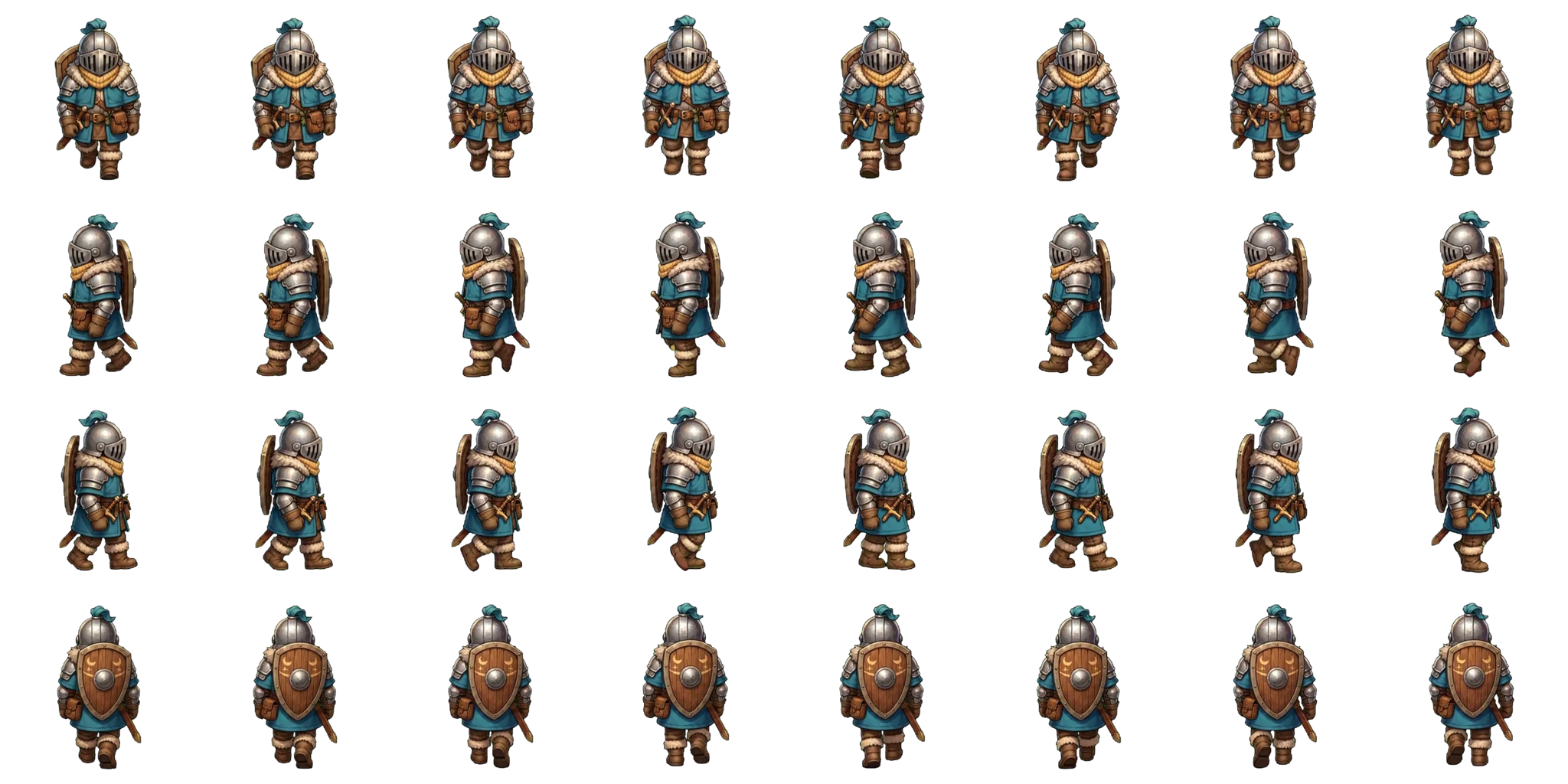
From your idea to an engine import
Choose four walking directions
The MZ export requires down, left, right, and up tracks. Start with one walking action across those four directions.
Review all four tracks
Check the character from each direction in the app. The sample shown here has eight frames in each of its four rows.
Export for RPG Maker MZ
Choose the MZ format and keep its default three frames per direction. The standard path uses a single-character image named $character.png.
Test the character in MZ
Import into a test project, check the character selection, and walk in each direction. Editor validation is still required before this workflow is marked ready.
THE IMPORTANT CONVERSION
From a rich animation atlas to the RPG Maker layout
Spritesheet AI can generate more animation frames than RPG Maker uses for a standard walking character. The RPG Maker MZ/MV export performs the conversion for you: it selects three useful poses for each direction and rearranges them into a 3-column × 4-row sheet.
The rows must be ordered down, left, right, up. RPG Maker plays the three columns as a walking cycle. This is why the original generation atlas should not simply be renamed and copied into your game.
NO MANUAL CROPPING
Choose RPG Maker MZ / MV when you export
Open the export dialog after checking all four directions, select RPG Maker MZ / MV, and keep three frames per animation for the standard format. Export preparation does not use additional generation credits.
For one character per file, keep the $ prefix in the filename. Copy the PNG into your project’s img/characters folder, select it as the actor’s walking character, and test every direction on a map.
Format references
The 3-pattern, 4-direction layout and $ filename convention are documented in the official RPG Maker MZ asset standards and RPG Maker MV asset standards.
More than a flat image.
The intended RPG Maker MZ / MV package contains:
- $character.png — standard single-character atlas
- spritesheet.json — animation metadata
- rpg-maker-import.json — standard-layout information
15 credits. A full set of moves.
One generation can contain up to 8 animations with up to 8 frames each. The final engine layout can differ from this 64-frame maximum.
See credit packs →Before you create
Does this cover every RPG Maker version?
No. This guide covers the shared walking-character layout used by RPG Maker MZ and MV. VX Ace and other editions are outside its scope.
Why only three frames in the engine export?
Generation and export are separate. The portable atlas may contain eight frames per track; the standard MZ export defaults to three. A nonstandard frame count is not a plug-and-play standard character layout.
Does the export cost more credits?
Preparing an engine export does not consume additional credits. Generation and previews have their own costs shown in the app.